Python Functions Under the Hood: Argument Passing, Mutability, Closures, and Decorators
- Published on
- Authors

- Name
- MD IBRAHIM
- @mdibrahim210
Python Functions Under the Hood: Argument Passing, Mutability, Closures, and Decorators
Python Under the Hood — Series 2 In Series 1, we built the runtime model behind Python:
Execution → Objects → Namespaces → LEGB → Execution Frames
Now we can use that model to understand one of the most important parts of Python: functions.
At the surface, a function call looks simple:
result = calculate(data)
But several things happen underneath:
Resolve the function name
        ↓
Resolve the argument expressions
        ↓
Create a new execution frame
        ↓
Bind argument objects to parameter names
        ↓
Execute the function body
        ↓
Mutate, create, or rebind objects
        ↓
Return an object
        ↓
Bind the returned object to a name
A useful mental model for this article is:
Python passes objects into functions by binding local parameter names to those objects. Mutation changes an object; rebinding changes a local name. Closures preserve access to enclosing bindings, and decorators use functions as first-class objects to wrap or transform behavior.
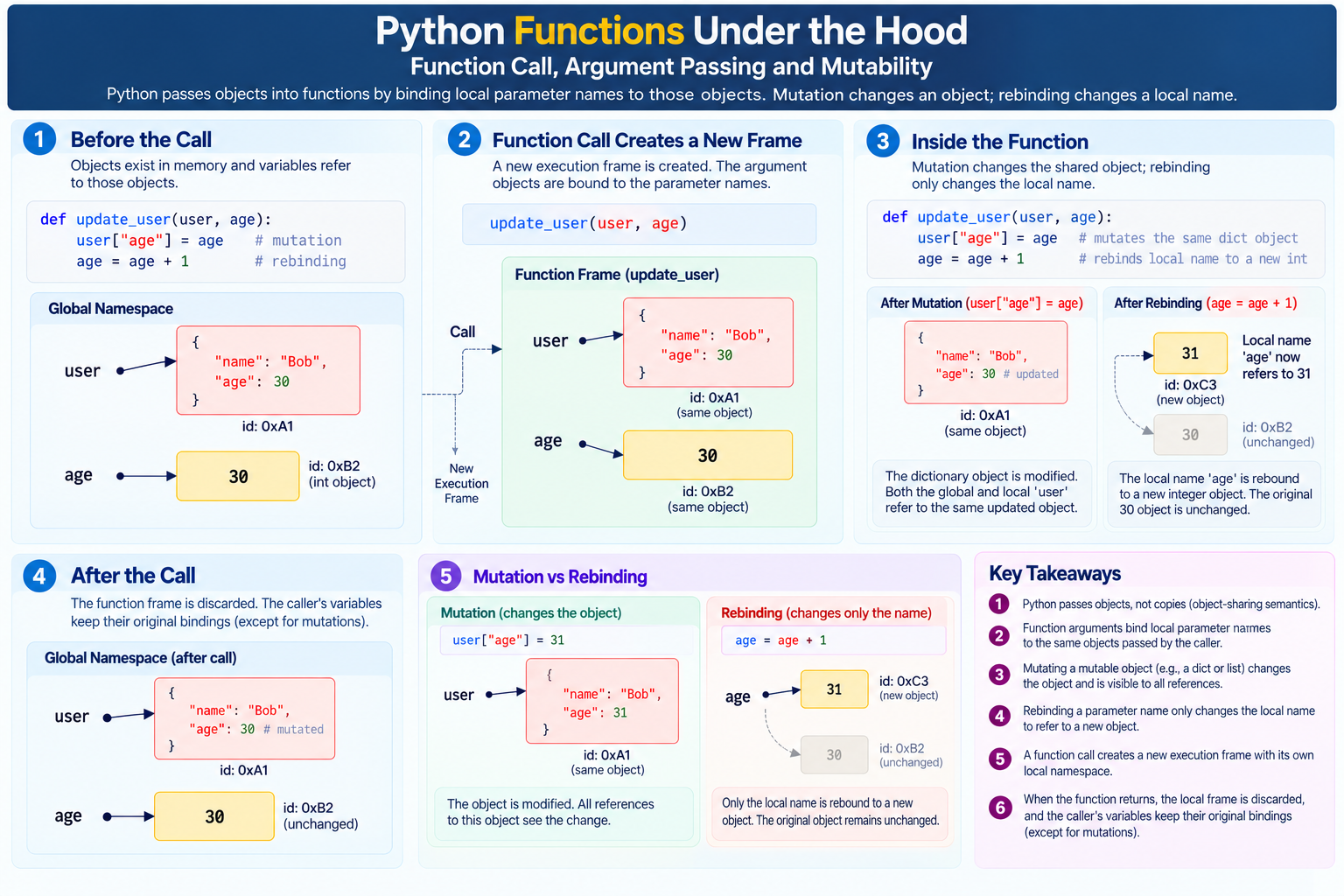
Figure 1 — A function call creates a new execution frame and binds parameter names to argument objects.
1. Functions Are Objects
In Python, a function is not only a block of code. A function is also an object.
def greet(name):
    return f"Hello, {name}"
When Python executes the def statement, it creates a function object and binds it to the name:
greet ───► <function object>
You can inspect it:
print(type(greet))
print(greet.__name__)
You can also bind another name to the same function:
say_hello = greet

print(say_hello("Bob"))
Output:
Hello, Bob
Conceptually:
greet ────────┐
              ▼
        <function object>
              ▲
say_hello ────┘
Both names refer to the same function object.
2. Functions Can Be Stored and Passed Around
Because functions are objects, they can be:
assigned to variables
stored in lists or dictionaries
passed as arguments
returned from other functions
created inside other functions
For example:
def add(a, b):
    return a + b

def subtract(a, b):
    return a - b

operations = {
    "add": add,
    "subtract": subtract,
}

print(operations["add"](10, 3))
Output:
13
The dictionary stores references to function objects.
This is one of the foundations of:
callbacks
event handlers
strategy patterns
dependency injection
decorators
functional programming
framework routing
3. What Happens When a Function Is Called?
Consider:
def add(a, b):
    result = a + b
    return result

answer = add(10, 20)
A useful conceptual flow is:
1. Resolve the name add
2. Evaluate argument expressions 10 and 20
3. Call the function object
4. Create a new execution frame
5. Bind parameter a to the object 10
6. Bind parameter b to the object 20
7. Execute the function body
8. Bind local result to the result object
9. Return that object
10. Bind answer to the returned object
During the call:
Frame: add()

Local namespace:

a      → 10
b      → 20
result → 30
After the function returns, the local execution frame is normally no longer active. The returned object can continue to exist because another name now refers to it:
answer ───► 30
4. Arguments vs. Parameters
Consider:
def greet(name):
    return f"Hello, {name}"

greet("Ibrahim")
Here:
name         → parameter
"Ibrahim"    → argument
A parameter is a name defined by the function. An argument is a value or expression supplied when the function is called.
Conceptually:
argument object
     │
     ▼
parameter name in new function frame
5. Python Uses Object-Sharing Semantics
Function argument behavior is often described in different ways:
pass by reference
pass by value
pass by object reference
call by sharing
The most useful model for Python is usually call by sharing or object-sharing semantics.
When you call:
func(obj)
the function parameter becomes a new local name bound to the same object supplied by the caller.
Example:
def inspect(items):
    print(items)

numbers = [1, 2, 3]

inspect(numbers)
Conceptually:
Caller namespace:

numbers ───────┐
               ▼
           [1, 2, 3]
               ▲
Function local:
               │
items ─────────┘
This single idea explains most Python argument-passing behavior.
6. Mutation Through a Function Parameter
def add_item(items):
    items.append(4)

numbers = [1, 2, 3]

add_item(numbers)

print(numbers)
Output:
[1, 2, 3, 4]
The function's local name items and the caller's name numbers refer to the same list object.
items.append(4)
mutates that shared object.
Mutation can be visible through every reference that points to the same mutable object.
7. Rebinding a Parameter Is Different
Compare:
def replace(items):
    items = [100, 200]

numbers = [1, 2, 3]

replace(numbers)

print(numbers)
Output:
[1, 2, 3]
Initially:
numbers ───────┐
               ▼
           [1, 2, 3]
               ▲
items ─────────┘
Then:
items = [100, 200]
rebinds only the local name:
numbers ───► [1, 2, 3]

items ─────► [100, 200]
The caller's binding never changed.
Mutation changes an object. Rebinding changes which object a local name refers to.
8. Immutable Arguments
def increment(value):
    value = value + 1

x = 10

increment(x)

print(x)
Output:
10
Inside the function:
x ────────┐
          ▼
         10
          ▲
value ────┘
Then:
value = value + 1
creates or obtains an integer object representing 11 and rebinds the local name:
x ───────► 10

value ───► 11
The integer object representing 10 was not mutated.
9. Mutation vs. Rebinding in Practice
These two functions look similar:
def version_a(items):
    items.append(4)
def version_b(items):
    items = items + [4]
But they behave differently.
append() mutates the existing list.
items + [4] creates a new list result and then rebinds the local name.
a = [1, 2, 3]
b = [1, 2, 3]

version_a(a)
version_b(b)

print(a)
print(b)
Output:
[1, 2, 3, 4]
[1, 2, 3]
The important question is:
Did the operation mutate the object, or did it produce another object and rebind the name?
10. += Depends on the Object Type
Consider:
items = [1, 2]
items += [3]
For lists, += normally updates the existing list in place.
But:
x = 10
x += 1
cannot mutate the integer 10, because integers are immutable.
So the same-looking operator can interact differently with different object types.
Understanding the object's mutability and protocol is more useful than memorizing syntax alone.
11. Positional Arguments
def describe(name, age):
    return f"{name} is {age}"

describe("Ibrahim", 30)
Binding happens by position:
"Ibrahim" ───► name
30        ───► age
Order matters.
12. Keyword Arguments
You can bind arguments by parameter name:
describe(name="Ibrahim", age=30)
or:
describe(age=30, name="Ibrahim")
The resulting bindings are still:
name → "Ibrahim"
age  → 30
Keyword arguments are often clearer when several parameters have similar types.
13. Default Parameters
def greet(name, greeting="Hello"):
    return f"{greeting}, {name}"
Then:
greet("Ibrahim")
uses:
greeting → "Hello"
while:
greet("Ibrahim", "Bonjour")
binds:
greeting → "Bonjour"
The important under-the-hood detail is:
Default argument expressions are evaluated when the function definition executes, not every time the function is called.
This creates one of Python's best-known pitfalls.
14. The Mutable Default Argument Trap
def add_item(item, items=[]):
    items.append(item)
    return items
Now:
print(add_item("A"))
print(add_item("B"))
print(add_item("C"))
You may expect:
["A"]
["B"]
["C"]
but you will typically get:
["A"]
["A", "B"]
["A", "B", "C"]
Why?
The default list is created once when Python executes the def statement.
Function definition
      ↓
default list created
      ↓
function object keeps a reference to it
Calls that omit items reuse the same list.
15. The Standard Fix for Mutable Defaults
Use None as a sentinel:
def add_item(item, items=None):
    if items is None:
        items = []

    items.append(item)
    return items
Now:
print(add_item("A"))
print(add_item("B"))
Output:
["A"]
["B"]
Each call without an explicit list creates a fresh one.
This behavior follows directly from:
function-definition time
objects
references
parameter binding
mutation
16. Positional-Only Parameters
Python can declare parameters that must be supplied positionally using /.
def divide(a, b, /):
    return a / b
Valid:
divide(10, 2)
Invalid:
divide(a=10, b=2)
The slash means:
parameters before /
        ↓
positional-only
This is useful when parameter names should not become part of the public API contract.
17. Keyword-Only Parameters
A * can mark parameters that must be supplied by keyword:
def connect(host, *, timeout=30, secure=True):
    ...
Valid:
connect("example.com", timeout=10, secure=False)
Invalid:
connect("example.com", 10, False)
The mental model is:
before *  → positional or keyword
after *   → keyword-only
This improves API readability.
18. *args: Extra Positional Arguments
def total(*numbers):
    return sum(numbers)
Call:
total(10, 20, 30)
Inside the function:
numbers → (10, 20, 30)
args is only a naming convention. The * is the important syntax.
19. **kwargs: Extra Keyword Arguments
def configure(**options):
    return options
Call:
configure(timeout=30, retries=3)
Inside the function:
options
is:
{
    "timeout": 30,
    "retries": 3,
}
Like args, the name kwargs is conventional rather than mandatory.
20. Unpacking Arguments at Call Time
* and ** can also unpack collections when calling a function.
def add(a, b):
    return a + b

values = [10, 20]

print(add(*values))
Conceptually:
add(10, 20)
For keyword arguments:
def connect(host, timeout):
    ...

options = {
    "host": "example.com",
    "timeout": 30,
}

connect(**options)
This capability is heavily used in wrappers, decorators, frameworks, and API clients.
21. Parameter Binding Happens Before the Body Runs
When Python calls:
func(...)
it first determines whether the supplied arguments can be bound to the function's parameters.
Errors such as:
missing required positional argument
multiple values for argument
unexpected keyword argument
too many positional arguments
happen because argument-to-parameter binding cannot be completed correctly.
The useful model is:
evaluate arguments
       ↓
bind parameters
       ↓
execute function body
22. Copying Mutable Objects
Sometimes a function should work with a list without modifying the caller's original object.
A shallow copy can help:
def sorted_copy(items):
    items = items.copy()
    items.sort()
    return items
Now:
numbers = [3, 1, 2]

result = sorted_copy(numbers)

print(numbers)
print(result)
Output:
[3, 1, 2]
[1, 2, 3]
23. Shallow Copy vs. Deep Copy
A shallow copy creates a new outer container but keeps references to the same nested objects.
original = [[1, 2], [3, 4]]
copy = original.copy()
Conceptually:
original ───► outer list A
                │
                ├──► inner list 1
                └──► inner list 2

copy ───────► outer list B
                │
                ├──► same inner list 1
                └──► same inner list 2
So:
copy[0].append(99)
also affects the nested list visible through original.
For independent nested copies:
import copy

clone = copy.deepcopy(original)
But deep copying everything is not automatically good design.
Often the better question is:
Who should own and mutate this object?
Clear ownership rules prevent many copying problems.
24. Return Values Are Objects Too
A function returns an object.
def add(a, b):
    return a + b
Then:
result = add(10, 20)
produces an object representing 30 and binds:
result ───► 30
If a function reaches the end without an explicit return:
def log_message(message):
    print(message)
Python returns:
None
25. Returning Multiple Values
def position():
    return 10, 20
Python is really returning a tuple:
(10, 20)
So:
point = position()
gives:
point ───► (10, 20)
And:
x, y = position()
uses iterable unpacking:
x → 10
y → 20
26. First-Class Functions
Python functions are first-class objects.
You can assign them:
def shout(text):
    return text.upper()

formatter = shout
Pass them:
def format_message(formatter, message):
    return formatter(message)

print(format_message(shout, "hello"))
Return them:
def get_formatter():
    return shout
Store them:
formatters = [str.upper, str.lower]
This makes higher-order functions and decorators natural in Python.
27. Higher-Order Functions
A higher-order function:
accepts another function
or
returns another function
Example:
def apply(operation, value):
    return operation(value)

def double(x):
    return x * 2

print(apply(double, 10))
Output:
20
The local parameter operation refers to the same function object as double.
28. Nested Functions
Functions can be created inside other functions:
def outer():

    def inner():
        return "Hello"

    return inner()
When outer() executes, the inner def statement creates an inner function object.
The inner name belongs to the outer function's local scope.
This becomes especially interesting when the inner function refers to values from the enclosing scope.
That leads to closures.
29. What Is a Closure?
def multiplier(factor):

    def multiply(number):
        return number * factor

    return multiply
Now:
double = multiplier(2)
Later:
double(10)
returns:
20
Even though multiplier(2) has already returned, multiply() can still access factor.
Conceptually:
double
   │
   ▼
multiply function
   │
   └──── closure ───► factor = 2
The returned function forms a closure over the required enclosing binding.
30. Closures and LEGB
Inside:
def multiplier(factor):

    def multiply(number):
        return number * factor

    return multiply
number is local to multiply().
factor is found in the enclosing scope.
Local       → number
Enclosing   → factor
That is the E in LEGB.
Closures therefore follow naturally from:
nested functions
lexical scope
enclosing bindings
function objects
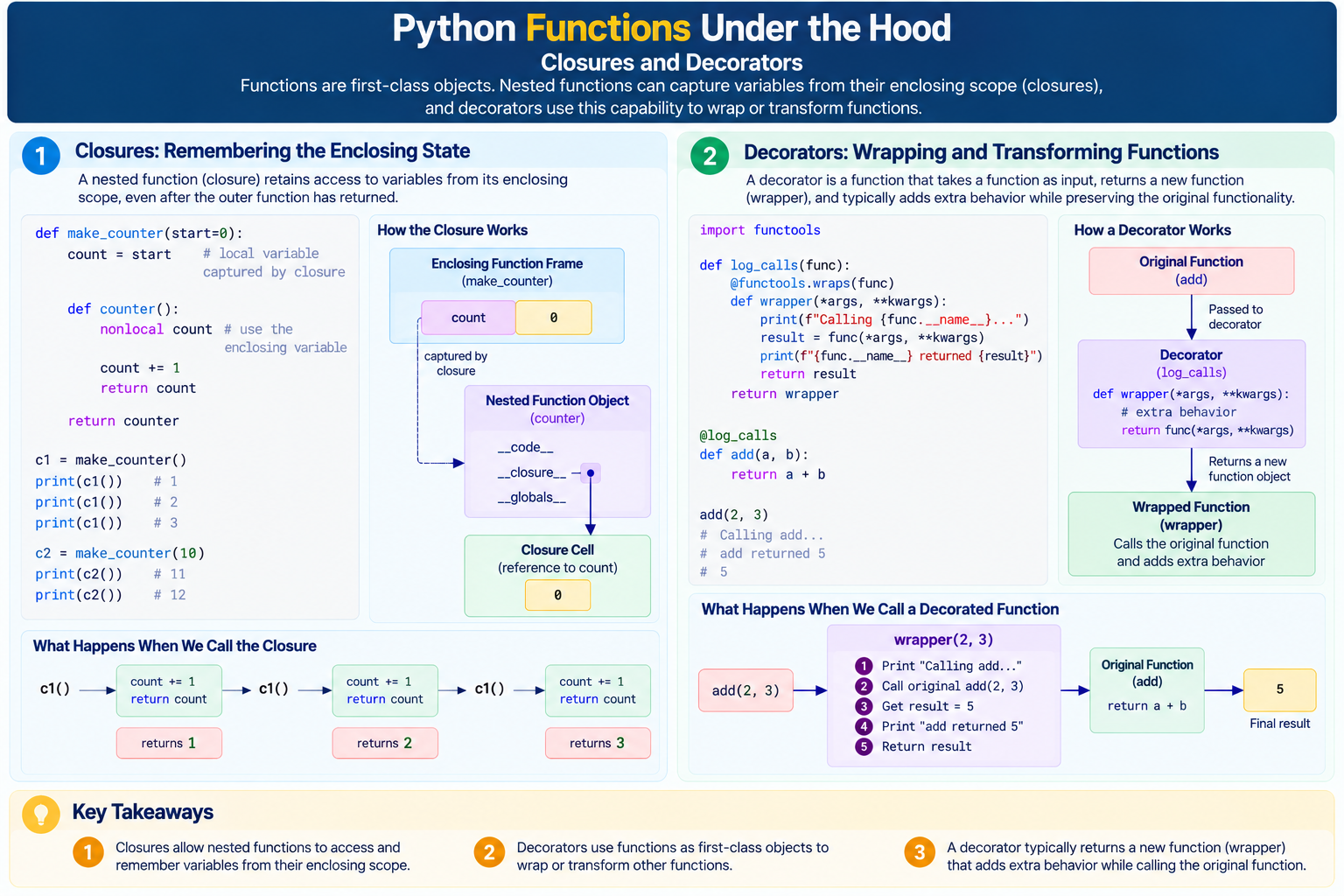
Figure 2 — Closures retain access to enclosing bindings, and decorators build on that capability by returning wrapper functions.
31. Closures as Function Factories
def power(exponent):

    def calculate(base):
        return base ** exponent

    return calculate
Now:
square = power(2)
cube = power(3)

print(square(5))
print(cube(5))
Output:
25
125
Conceptually:
square
   └── closure → exponent = 2

cube
   └── closure → exponent = 3
The same function structure can produce customized behavior.
32. Inspecting a Closure
Python exposes closure information on function objects.
def multiplier(factor):

    def multiply(number):
        return number * factor

    return multiply


double = multiplier(2)

print(double.__closure__)
print(double.__code__.co_freevars)
A closure should not be imagined as "the entire outer frame kept alive forever."
A better model is:
Python preserves the cells or bindings needed by the nested function.
33. Changing Enclosing State with nonlocal
def make_counter():
    count = 0

    def increment():
        nonlocal count
        count += 1
        return count

    return increment
Now:
counter = make_counter()

print(counter())
print(counter())
print(counter())
Output:
1
2
3
nonlocal count tells Python to update the binding from an enclosing function scope.
34. Closure State vs. Global State
Compare:
counter = 0

def increment():
    global counter
    counter += 1
with:
def make_counter():
    counter = 0

    def increment():
        nonlocal counter
        counter += 1
        return counter

    return increment
The closure version can create independent counters:
counter_a = make_counter()
counter_b = make_counter()
Conceptually:
counter_a ───► closure state A

counter_b ───► closure state B
This usually provides better isolation than one shared global variable.
35. A Classic Closure Trap in Loops
functions = []

for i in range(3):
    functions.append(lambda: i)

for func in functions:
    print(func())
A beginner may expect:
0
1
2
but the result is typically:
2
2
2
Why?
The functions close over the name i, not a frozen copy of its value for each iteration.
By the time they run:
i → 2
36. Capturing the Current Loop Value
A common technique is:
functions = []

for i in range(3):
    functions.append(lambda i=i: i)
Now:
for func in functions:
    print(func())
outputs:
0
1
2
Each lambda receives its own default argument when the lambda expression is evaluated.
This combines two important ideas:
closure binding behavior
default argument evaluation time
37. What Is a Decorator?
A decorator is a callable that takes another callable and returns a replacement or wrapped callable.
Start with:
def greet():
    return "Hello"
Now:
def add_logging(func):

    def wrapper():
        print("Calling function")
        return func()

    return wrapper
Apply it manually:
greet = add_logging(greet)
Conceptually:
original greet function
        ↓
passed to add_logging
        ↓
wrapper function created
        ↓
wrapper closes over original function
        ↓
name greet rebound to wrapper
That is the fundamental decorator mechanism.
38. The @decorator Syntax
Python provides syntactic sugar:
@add_logging
def greet():
    return "Hello"
This is approximately equivalent to:
def greet():
    return "Hello"

greet = add_logging(greet)
When you see:
@decorator
def function():
    ...
think:
create function object
      ↓
pass it to decorator
      ↓
receive replacement callable
      ↓
bind function name to replacement
39. A Basic Decorator
def log_call(func):

    def wrapper():
        print(f"Calling {func.__name__}")
        result = func()
        print("Finished")
        return result

    return wrapper


@log_call
def greet():
    return "Hello"
Now:
print(greet())
produces output similar to:
Calling greet
Finished
Hello
The wrapper can access func through a closure.
That is why closures and decorators naturally belong together.
40. Decorators Need to Forward Arguments
A reusable decorator should usually handle arbitrary arguments:
def log_call(func):

    def wrapper(*args, **kwargs):
        print(f"Calling {func.__name__}")
        return func(*args, **kwargs)

    return wrapper
Now it can wrap:
@log_call
def add(a, b):
    return a + b
The wrapper receives:
positional arguments → *args
keyword arguments    → **kwargs
and forwards them to the original function.
This combines:
first-class functions
closures
*args
**kwargs
argument unpacking
name rebinding
41. Preserve Metadata with functools.wraps
Without help, a wrapper can hide useful metadata from the original function.
Use:
from functools import wraps


def log_call(func):

    @wraps(func)
    def wrapper(*args, **kwargs):
        return func(*args, **kwargs)

    return wrapper
@wraps(func) preserves important metadata such as:
__name__
__doc__
__module__
__annotations__
and also maintains the __wrapped__ relationship used by introspection tools.
Practical rule:
Use
@wraps(func)when writing normal function decorators that return wrappers.
42. A Timing Decorator
from functools import wraps
from time import perf_counter


def measure_time(func):

    @wraps(func)
    def wrapper(*args, **kwargs):
        start = perf_counter()

        try:
            return func(*args, **kwargs)
        finally:
            elapsed = perf_counter() - start
            print(f"{func.__name__}: {elapsed:.6f}s")

    return wrapper
Use:
@measure_time
def calculate():
    return sum(range(1_000_000))
When calculate() runs, the name actually refers to the wrapper.
The wrapper:
records start time
      ↓
calls original calculate
      ↓
returns original result
      ↓
records elapsed time
The original function remains reachable through the closure.
43. Decorators with Their Own Arguments
Suppose we want:
@repeat(3)
def greet():
    print("Hello")
We need another layer:
from functools import wraps


def repeat(times):

    def decorator(func):

        @wraps(func)
        def wrapper(*args, **kwargs):
            result = None

            for _ in range(times):
                result = func(*args, **kwargs)

            return result

        return wrapper

    return decorator
Conceptually:
repeat(3)
    ↓
returns decorator
    ↓
decorator(greet)
    ↓
returns wrapper
    ↓
greet name → wrapper
The wrapper reaches both:
func
times
through enclosing scopes.
44. Expanding Decorator Syntax Mentally
Whenever you see:
@repeat(3)
def greet():
    ...
expand it mentally to:
def greet():
    ...

greet = repeat(3)(greet)
Then:
repeat(3)
     ↓
decorator

decorator(greet)
     ↓
wrapper

greet = wrapper
This makes complex decorators easier to reason about.
45. Stacking Multiple Decorators
Python allows:
@decorator_a
@decorator_b
def func():
    ...
This is approximately:
func = decorator_a(decorator_b(func))
The decorator closest to the function is applied first.
original func
    ↓
decorator_b
    ↓
wrapped B
    ↓
decorator_a
    ↓
wrapped A
    ↓
name func
Decorator order matters when wrappers perform operations such as:
authentication
logging
caching
transactions
validation
retry logic
46. Decorators Execute at Definition Time
def decorator(func):
    print("Decorating")
    return func


@decorator
def greet():
    print("Hello")
The message:
Decorating
appears when Python executes the function definition and applies the decorator.
It does not wait for:
greet()
This follows directly from Series 1:
module execution reaches def
        ↓
function object created
        ↓
decorator applied
        ↓
returned object bound to function name
47. What Decorators Are Used For
Decorators are useful for cross-cutting behavior:
logging
timing
caching
authorization
validation
retry policies
rate limiting
registration
dependency injection
transactions
route declaration
For example:
@cache
def expensive_calculation(...):
    ...
or:
@app.get("/users")
def get_users():
    ...
Framework decorators may do more than wrap a function; they can also register functions in framework-owned data structures.
The core rule remains:
A decorator receives a callable and returns, wraps, or registers behavior associated with that callable.
48. Closures vs. Classes for State
A closure can maintain state:
def make_counter():
    count = 0

    def increment():
        nonlocal count
        count += 1
        return count

    return increment
A class can do something similar:
class Counter:

    def __init__(self):
        self.count = 0

    def __call__(self):
        self.count += 1
        return self.count
Closures are often elegant for small, focused state.
Classes become useful when you need:
multiple related methods
clear public state
inheritance
richer object protocols
larger behavior sets
49. Common Mistakes to Watch For
Mistake 1 — Expecting parameter rebinding to affect the caller
def replace(items):
    items = []
This rebinds only the local name.
Mistake 2 — Accidentally mutating caller-owned data
def normalize(items):
    items.sort()
This sorts the caller's list in place.
Mistake 3 — Mutable default arguments
def add(item, items=[]):
    ...
The same default object is reused.
Mistake 4 — Late binding in closures
lambda: i
inside a loop usually resolves the shared binding later.
Mistake 5 — Forgetting functools.wraps
The wrapper can hide metadata from the original function.
Mistake 6 — Forgetting to return the original result
Bad:
def wrapper(*args, **kwargs):
    func(*args, **kwargs)
Usually better:
def wrapper(*args, **kwargs):
    return func(*args, **kwargs)
Mistake 7 — Swallowing exceptions accidentally
Decorators should not silently consume exceptions unless that behavior is intentional and documented.
50. One Worked Example Tying Everything Together
from functools import wraps


def count_calls(func):
    count = 0

    @wraps(func)
    def wrapper(*args, **kwargs):
        nonlocal count
        count += 1

        result = func(*args, **kwargs)

        print(
            f"{func.__name__} has been called "
            f"{count} time(s)"
        )

        return result

    return wrapper


@count_calls
def add(a, b):
    return a + b
Now:
print(add(10, 20))
print(add(5, 7))
Step 1 — Python creates the original function
add ───► original function object
Step 2 — The decorator is applied
Python effectively performs:
add = count_calls(add)
Now:
add ───► wrapper function
Step 3 — The wrapper has closure state
add
 │
 ▼
wrapper
 │
 ├── closure → original add
 └── closure → count
Step 4 — Arguments are bound
When:
add(10, 20)
runs:
args   → (10, 20)
kwargs → {}
Step 5 — nonlocal updates state
count += 1
changes the enclosing binding.
Step 6 — Arguments are forwarded
func(*args, **kwargs)
becomes conceptually:
original_add(10, 20)
The original function gets its own frame:
a → 10
b → 20
and returns:
30
Step 7 — The wrapper returns the result
return result
returns:
30
This one example combines:
first-class functions
argument binding
*args
**kwargs
closures
nonlocal
decorators
function metadata
return values
51. The Function Mental Model
When you see:
result = process(data)
think:
1. Resolve process
        ↓
   function object

2. Resolve/evaluate data
        ↓
   argument object

3. Create function frame
        ↓

4. Bind parameter name
        ↓
   parameter ───► same object

5. Execute body
        ↓

6. Maybe mutate objects
   OR rebind local names
        ↓

7. Return an object
        ↓

8. Bind result
When you see a closure:
inner function
     ↓
retains access to required enclosing bindings
When you see a decorator:
original function
       ↓
decorator
       ↓
replacement / wrapper callable
       ↓
function name rebound
52. Five Rules Worth Memorizing
Rule 1 — Parameters are local names
Calling:
func(obj)
conceptually creates:
parameter ───► same object as obj
inside the new frame.
Rule 2 — Mutation and rebinding are different
Mutation
→ changes an object

Rebinding
→ changes which object a name refers to
Rule 3 — Default arguments are created at definition time
That is why:
def func(items=[]):
can unintentionally reuse state.
Rule 4 — Closures retain access to enclosing bindings
A returned inner function can keep using required values from the scope where it was created.
Rule 5 — A decorator is fundamentally a callable transformation
Think:
@decorator
def func():
    ...
as:
func = decorator(func)
53. Exercise 1 — Mutation or Rebinding?
Predict the output:
def update(data):
    data.append(4)
    data = [100, 200]
    return data


numbers = [1, 2, 3]

result = update(numbers)

print(numbers)
print(result)
Answer
[1, 2, 3, 4]
[100, 200]
data.append(4) mutates the shared list.
Then:
data = [100, 200]
rebinds only the local parameter name.
54. Exercise 2 — Mutable Default
Predict:
def collect(value, items=[]):
    items.append(value)
    return items


print(collect(1))
print(collect(2))
print(collect(3))
Answer
[1]
[1, 2]
[1, 2, 3]
The default list is created when the function is defined and reused by calls that do not provide items.
55. Exercise 3 — Closure Lookup
Predict:
def make_message(prefix):

    def build(text):
        return f"{prefix}: {text}"

    return build


warning = make_message("WARNING")

print(warning("Disk almost full"))
Answer
WARNING: Disk almost full
text is local to build(), while prefix is resolved from the enclosing scope preserved by the closure.
56. Exercise 4 — Decorator Expansion
Given:
@log_call
def calculate(x):
    return x * 2
Rewrite it without decorator syntax.
Answer
def calculate(x):
    return x * 2

calculate = log_call(calculate)
That transformation is the foundation for understanding decorators.
57. Final Mental Picture
The central idea of this article is how the runtime model from Series 1 explains functions naturally.
Object model
    ↓
arguments are objects

Name binding
    ↓
parameters are local names

Mutability
    ↓
shared objects may be modified

Execution frames
    ↓
every call gets local state

LEGB
    ↓
nested functions can resolve enclosing names

First-class functions
    ↓
functions can be passed and returned

Closures
    ↓
returned functions retain required bindings

Decorators
    ↓
functions transform or wrap other functions
That gives us one connected model:
Functions are objects. Calls create execution frames. Arguments are bound to local parameter names. Mutation affects shared objects, while rebinding affects local names. Nested functions can retain enclosing bindings through closures, and decorators use those capabilities to transform callable behavior.
Where to Go Next
With Series 1 and Series 2 together, we now understand much of Python's runtime behavior:
Series 1
Execution
Memory
Objects
Namespaces
LEGB
Frames
      ↓
Series 2
Functions
Argument binding
Mutability
Closures
Decorators