Python Under the Hood: Execution, Memory, Namespaces, and LEGB
- Published on
- Authors

- Name
- MD IBRAHIM
- @mdibrahim210
Python Under the Hood: Execution, Memory, Namespaces, and LEGB
Python Under the Hood — Series 1
Python can feel simple at the surface:
x = 10
print(x)
But beneath that simple syntax, several important ideas are working together.
This tutorial follows them in the order they connect conceptually:
Python Execution → Objects in Memory → Namespaces → LEGB Name Resolution
A useful mental model to hold onto throughout the article is:
Python creates and works with objects in memory, binds names to those objects inside namespaces, and uses scope rules such as LEGB to decide where a name should be resolved.
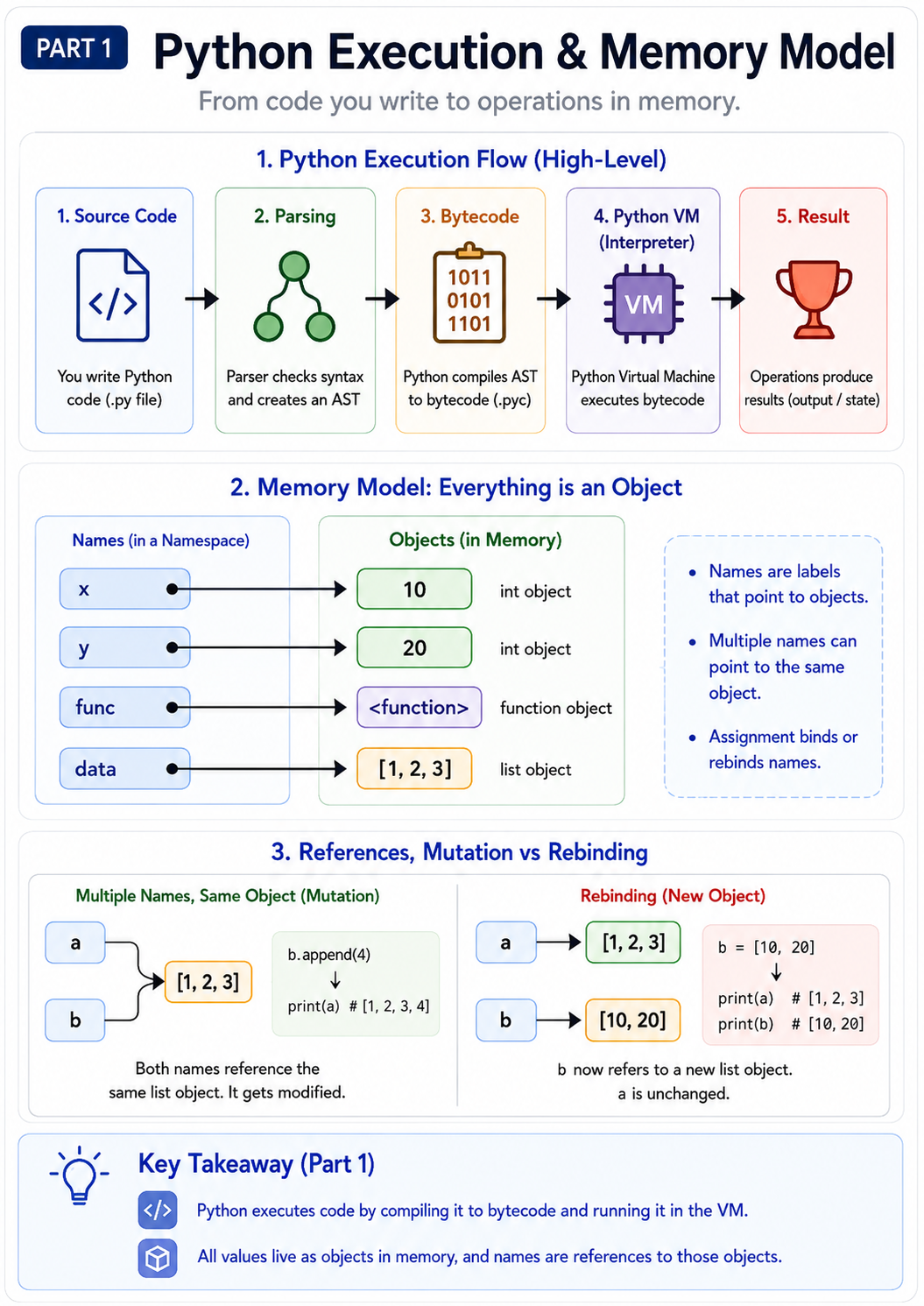
Figure 1 — High-level Python execution flow, object-based memory model, and the difference between mutation and rebinding.
1. How Python Executes Code
Consider:
x = 10
y = 20
result = x + y

print(result)
At a high level, CPython processes code through stages like these:
Python Source Code
      ↓
Parsing
      ↓
Abstract Syntax Tree (AST)
      ↓
Compilation to Bytecode
      ↓
Python Virtual Machine / Interpreter
      ↓
Objects, Operations, and Results
For example:
x = 10
can be understood conceptually as:
1. Obtain or create an integer object representing 10
2. Add the name "x" to the current namespace
3. Bind "x" to that integer object
It is better not to imagine x as a box physically containing 10.
A more useful model is:
Namespace                  Memory

"x" ──────────────────────► int object: 10
That distinction becomes extremely important once we begin working with lists, dictionaries, functions, shared references, and function arguments.
1.1 Source Code, Parsing, AST, and Bytecode
Python source code first has to be understood syntactically.
For example:
result = a + b
is parsed into a structured representation of the program. One of the important internal representations is the Abstract Syntax Tree (AST).
The AST represents the meaning and structure of the code rather than its raw characters.
Conceptually:
Assignment
   ├── target: result
   └── value: addition
          ├── a
          └── b
CPython then compiles this structure into bytecode.
You can inspect the bytecode generated for a function with the dis module:
import dis

def add(a, b):
    return a + b

dis.dis(add)
The exact bytecode instructions can differ between Python and CPython versions because bytecode is an implementation detail.
Conceptually, however, the interpreter performs work similar to:
load a
load b
perform addition
return result
So the important model is:
Python source
     ↓
parsed structure
     ↓
bytecode
     ↓
CPython executes the bytecode
1.2 Bytecode Caching
CPython may cache valid bytecode for imported modules inside directories such as:
__pycache__/
with files such as:
module.cpython-XXX.pyc
If the cached bytecode is still valid, CPython can reuse it instead of recompiling the unchanged imported module.
This caching is an implementation optimization. It does not change the Python language semantics.
1.3 Module Execution Is Top-to-Bottom
At module load time, Python executes statements from top to bottom.
Consider:
print("A")

def foo():
    print("C")

print("B")

foo()
Output:
A
B
C
Why does "C" appear last?
Because executing:
def foo():
    print("C")
creates a function object and binds it to the name foo, but the body of foo() does not run until the function is called.
So:
def statement executes
        ↓
function object is created
        ↓
name is bound to that object
        ↓
function body waits until call time
Classes follow a related model: a class statement is executable code that creates a class object.
1.4 A Note About the GIL
Traditional CPython builds use a Global Interpreter Lock (GIL).
In those builds, only one thread at a time normally executes Python bytecode inside a process.
This is one reason CPU-bound Python programs have traditionally used techniques such as:
multiprocessing
native extensions
vectorized libraries
multiple worker processes
rather than assuming that ordinary Python threads will execute CPU-heavy Python bytecode fully in parallel.
However, the GIL is an implementation/runtime characteristic rather than a rule of the Python language itself. Modern CPython also supports optional free-threaded configurations, so it is better to treat the GIL as part of CPython's runtime model rather than Python's fundamental semantics.
2. Python's Memory Model
Python is fundamentally object-oriented at runtime.
Almost everything you interact with is an object:
10
3.14
"hello"
[1, 2, 3]
{"name": "Ibrahim"}
lambda x: x + 1
Even functions, classes, and modules are objects.
Every Python object can be thought of as having at least three important properties:
Identity
Type
Value
For example:
x = 100

print(id(x))
print(type(x))
print(x)
Conceptually:
identity → which object is this?
type     → what kind of object is this?
value    → what value does it represent?
3. Variables Are Names, Not Containers
This is one of the most important Python concepts.
Consider:
x = [1, 2, 3]
A beginner may imagine:
x is a box containing [1, 2, 3]
A better mental model is:
x
│
▼
[1, 2, 3]
x is a name bound to an object.
Now:
y = x
does not automatically copy the list.
Instead:
x ────────┐
           ▼
        [1, 2, 3]
           ▲
y ────────┘
Both names refer to the same object.
Therefore:
x = [1, 2, 3]
y = x

y.append(4)

print(x)
Output:
[1, 2, 3, 4]
The important observation is:
y.append(4)modifies the shared list object. It does not merely change the namey.
4. Identity vs. Equality: is and ==
Python distinguishes between object identity and value equality.
Equality: ==
== asks:
Do these objects have equal values according to their equality semantics?
Identity: is
is asks:
Are both references pointing to the exact same object?
Example:
a = [1, 2]
b = [1, 2]

print(a == b)
print(a is b)
Typical output:
True
False
Conceptually:
a ───► [1, 2]

b ───► [1, 2]
The contents are equal, but the two names refer to different list objects.
A good rule of thumb is:
x == y
for comparing values, and:
x is None
for identity-based checks involving singleton objects such as None.
4.1 Do Not Rely on Object Caching for is
CPython commonly caches some small integer objects and interns certain strings as implementation optimizations.
That can make identity experiments produce surprising results:
a = 10
b = 10

print(a is b)
But these optimizations should never be used to determine whether values are equal.
For value comparison, use:
a == b
not:
a is b
5. Mutable vs. Immutable Objects
Python objects can broadly be divided into mutable and immutable objects.
| Immutable | Mutable |
| ----------- | --------------------------- |
| int | list |
| float | dict |
| bool | set |
| str | most user-defined instances |
| tuple | |
| frozenset | |
5.1 Immutable Objects
An immutable object's value cannot be changed in place.
Consider:
x = 10
x = x + 1
Conceptually:
Before:

x ───► 10


After:

        10

x ───► 11
Python did not transform the integer object 10 into 11.
Instead, the name x became bound to an object representing 11.
This is rebinding.
5.2 Mutable Objects
Mutable objects can be changed in place.
For example:
x = [1, 2]

x.append(3)
Conceptually:
Before:

x ───► [1, 2]


After:

x ───► [1, 2, 3]
The important difference is:
Mutation
    ↓
change an existing object

Rebinding
    ↓
change which object a name refers to
This distinction becomes critical when Python functions begin receiving lists, dictionaries, sets, and other mutable objects.
We will examine that behavior in detail in the next article in this series.
6. References and Garbage Collection
Consider:
x = [1, 2, 3]
y = x
Conceptually:
x ──┐
    ├──► [1, 2, 3]
y ──┘
Now:
del x
removes the binding for x.
The list still exists because y refers to it:
y ───► [1, 2, 3]
If the remaining references to the object disappear, the object becomes eligible for cleanup.
Traditional CPython primarily uses reference counting.
Conceptually:
Object
  ↓
How many active references point to me?
When an object's reference count reaches zero, CPython can usually reclaim it immediately.
However, reference counting alone cannot solve every situation.
Consider two objects that reference each other:
Object A ───► Object B
    ▲           │
    └───────────┘
They may form a reference cycle even when the rest of the program can no longer reach them.
CPython therefore also has a cyclic garbage collector that helps detect and clean up eligible reference cycles.
The gc module exposes parts of this machinery.
The important practical rule is:
Do not design application correctness around the exact moment an object will be garbage-collected.
Different Python implementations can have different memory-management behavior.
7. What Is a Namespace?
A namespace is a mapping between names and objects.
Conceptually, it behaves like:
{
    "x": <object>,
    "name": <object>,
    "calculate": <function object>
}
For example:
x = 10
name = "Ibrahim"
can be imagined as:
{
    "x": 10,
    "name": "Ibrahim"
}
The dictionary analogy is useful, but remember that namespaces are part of Python's execution semantics rather than simply ordinary dictionaries in every implementation detail.
Python lets you inspect some namespaces directly:
globals()
locals()
globals() gives access to the current module's global namespace mapping.
locals() gives a representation of the currently active local namespace.
8. Why Namespaces Exist
Imagine two libraries both contain a name:
config
Without namespace separation, names across programs and libraries would constantly collide.
Instead, Python can keep names associated with different modules and scopes.
For example:
math.pi
and:
my_module.pi
can refer to completely different objects.
Conceptually:
math namespace

{
    "pi": 3.14159...
}


my_module namespace

{
    "pi": something_else
}
Namespaces make it possible to organize large Python systems without forcing every variable, function, and class in every module to have a globally unique name.
9. The Major Scopes and LEGB
When Python encounters a bare name such as:
x
it needs rules for deciding where to look for that name.
For many ordinary name lookups inside functions, the most useful model is:
L → Local
E → Enclosing
G → Global
B → Built-in
This is known as the LEGB rule.
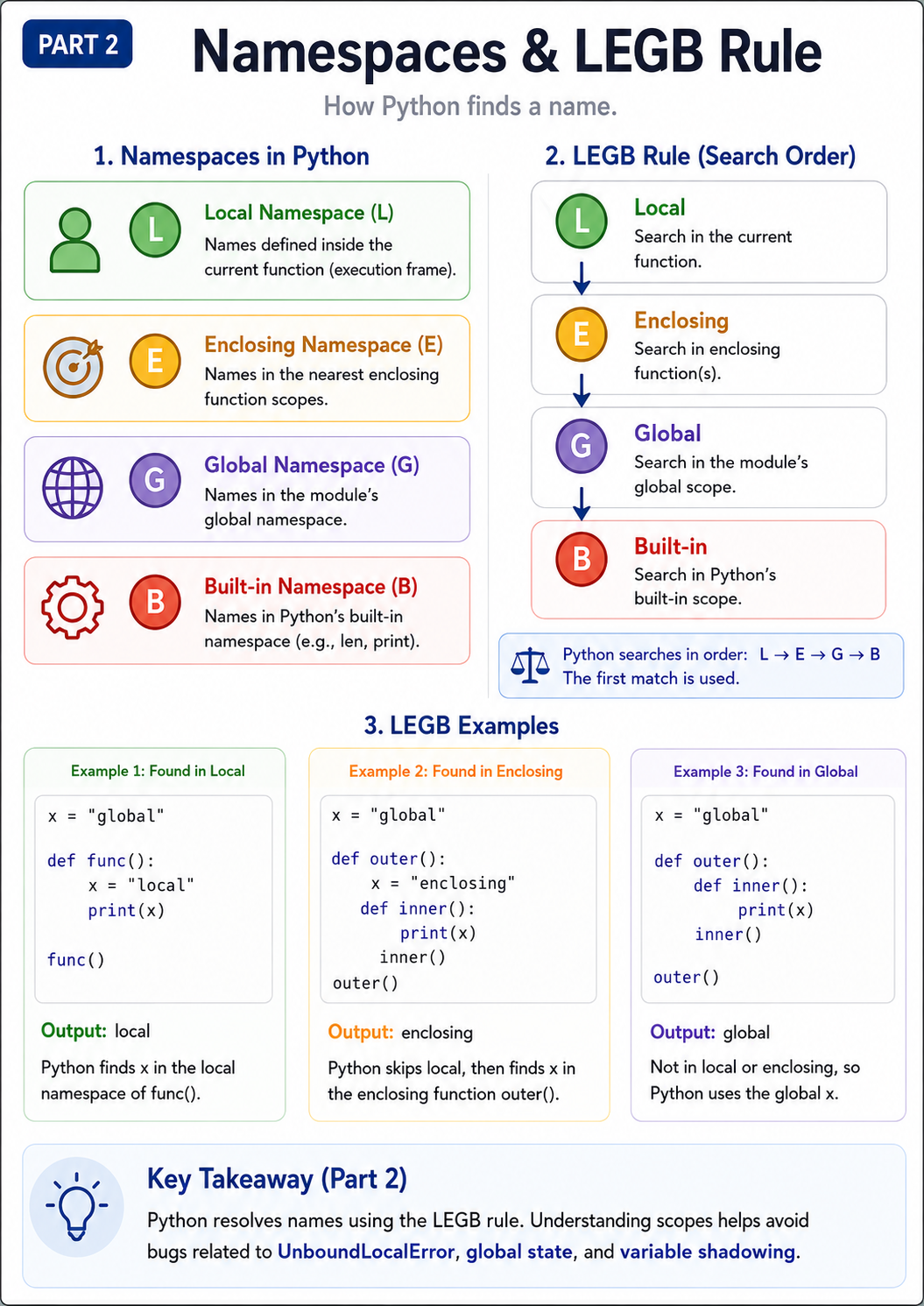
Figure 2 — Python namespaces and the Local → Enclosing → Global → Built-in name-resolution order.
10. Local Scope
Consider:
def calculate():
    x = 100
    print(x)

calculate()
During the function call, x belongs to the function's local namespace.
Conceptually:
calculate() local namespace

{
    "x": 100
}
If no global x exists, this would fail outside the function:
print(x)
with:
NameError
11. Global Scope
A name assigned at module level belongs to that module's global namespace.
Example:
name = "Ibrahim"

def greet():
    print(name)

greet()
When Python evaluates:
name
inside greet(), the search can be understood as:
Local      → not found
Enclosing  → not applicable / not found
Global     → found
Output:
Ibrahim
12. Enclosing Scope
Enclosing scope becomes important with nested functions.
def outer():
    message = "Hello"

    def inner():
        print(message)

    inner()

outer()
Inside inner(), no local variable named message exists.
Python therefore searches the enclosing function scope and finds:
message = "Hello"
Conceptually:
inner local scope
      ↓ not found

outer enclosing scope
      ↓ found

message → "Hello"
13. Built-in Scope
Python provides many built-in names:
print
len
range
str
int
list
dict
sum
min
max
For example:
print(len("Python"))
If neither print nor len has been shadowed by a closer scope, Python can resolve them from the built-in namespace.
14. The LEGB Rule, Step by Step
Consider:
x = "global"

def outer():
    x = "enclosing"

    def inner():
        x = "local"
        print(x)

    inner()

outer()
When inner() evaluates:
x
Python finds:
Local → x = "local"
So the output is:
local
Now remove the local assignment:
x = "global"

def outer():
    x = "enclosing"

    def inner():
        print(x)

    inner()

outer()
The search becomes:
Local      → no
Enclosing  → yes
Output:
enclosing
Remove the enclosing assignment too:
x = "global"

def outer():

    def inner():
        print(x)

    inner()

outer()
Now:
Local      → no
Enclosing  → no
Global     → yes
Output:
global
14.1 Visualizing LEGB
Imagine Python sees:
print(x)
inside a nested function.
The lookup can be visualized as:
┌────────────────────────┐
│ Local namespace        │
│ Is x here?             │
└────────────┬───────────┘
             │ no
             ▼
┌────────────────────────┐
│ Enclosing namespace    │
│ Is x here?             │
└────────────┬───────────┘
             │ no
             ▼
┌────────────────────────┐
│ Global namespace       │
│ Is x here?             │
└────────────┬───────────┘
             │ no
             ▼
┌────────────────────────┐
│ Built-in namespace     │
│ Is x here?             │
└────────────┬───────────┘
             │ no
             ▼
          NameError
The first matching binding is the one Python uses for that ordinary lookup.
15. Assignment Changes the Situation
Consider:
x = 10

def test():
    print(x)

test()
This works and prints:
10
Now consider:
x = 10

def test():
    print(x)
    x = 20

test()
This raises:
UnboundLocalError
Why?
Because Python determines the scope of many names when compiling the function body.
Since x is assigned inside test():
x = 20
Python treats x as a local name in that function unless told otherwise.
Conceptually:
test() local scope expects:

x

print(x)
      ↑
local x has not received a value yet
That produces UnboundLocalError.
This behavior becomes much easier to understand once the LEGB model and the difference between lookup and assignment are clear.
16. The global Keyword
Suppose:
counter = 0

def increment():
    counter = counter + 1
Because the function assigns to counter, Python normally treats counter as local to the function.
But the right-hand side tries to read that local value before it has been assigned.
One possible solution is:
counter = 0

def increment():
    global counter
    counter = counter + 1

increment()

print(counter)
Output:
1
global counter tells Python that assignments to counter inside this function should target the module's global binding.
Although global is useful, heavy reliance on global mutable state usually makes programs harder to reason about, test, and maintain.
17. The nonlocal Keyword
Nested functions can use:
nonlocal
to work with a binding from an enclosing function scope.
Example:
def outer():
    count = 0

    def increment():
        nonlocal count
        count += 1

    increment()
    increment()

    print(count)

outer()
Output:
2
nonlocal count tells Python:
Use the
countbinding from an enclosing function scope instead of creating a new local binding insideincrement().
18. A Preview of Closures
Enclosing scope enables an important Python feature called a closure.
An inner function can retain access to variables from an enclosing scope even after the outer function has returned.
For example:
def multiplier(factor):

    def multiply(number):
        return number * factor

    return multiply
Now:
double = multiplier(2)

print(double(10))
Output:
20
Conceptually:
double
   │
   ▼
multiply()
   │
   └──── remembers enclosing factor = 2
Closures are especially important when studying:
function factories
callbacks
decorators
functional-style programming
We will explore closures in much greater depth in the next article in this series.
19. Comprehensions and Scope
In Python 3, comprehensions have their own scope behavior.
Consider:
x = "global"

squares = [x for x in range(3)]

print(x)
Output:
global
The comprehension's loop variable does not overwrite the surrounding x.
This is another example of why scope rules matter beyond ordinary function definitions.
20. Execution Frames and the Call Stack
When a Python function is called, Python creates an execution frame.
A frame contains information needed to execute that function call, including its local state.
Consider:
def add(a, b):
    result = a + b
    return result

add(10, 20)
Conceptually:
Frame: add()

locals:

a      → 10
b      → 20
result → 30
Once the function returns, the active execution frame is normally no longer needed.
However, some objects associated with a frame can outlive the original call when something still references them, as happens with closures and some traceback-related situations.
20.1 The Call Stack
Consider:
def a():
    b()

def b():
    c()

def c():
    print("Hello")

a()
The calls conceptually build a stack:
┌─────────────┐
│ c() frame   │ ← currently executing
├─────────────┤
│ b() frame   │
├─────────────┤
│ a() frame   │
├─────────────┤
│ module      │
└─────────────┘
When c() returns, control goes back to b().
When b() returns, control goes back to a().
This model is fundamental for understanding:
recursion
exceptions
tracebacks
debugging
nested function calls
21. Shadowing Built-ins
Consider:
list = [1, 2, 3]
This is legal Python.
But now the name:
list
in the current scope refers to your list object rather than the built-in list type.
Later:
list("abc")
may fail because name resolution finds your binding before it reaches the built-in namespace.
Conceptually:
Global list
    ↓
found

Built-in list
    ↓
never reached
This is called shadowing.
It is usually wise to avoid names such as:
list
dict
str
int
id
type
sum
min
max
when you still need the corresponding built-in in the same scope.
22. Modules Are Namespaces
Modules provide namespaces too.
Consider:
import math
The math module exposes names such as:
math.pi
math.sqrt
math.sin
Conceptually:
math namespace

{
    "pi": ...,
    "sqrt": ...,
    "sin": ...
}
When Python evaluates:
math.sqrt(16)
there are two related operations:
resolve the name "math"
          ↓
access attribute "sqrt" on the module object
Module namespaces are one of the reasons large Python applications can be split cleanly across many files and packages.
23. Classes Create Namespaces Too
Classes also introduce a namespace during class creation.
Example:
class User:
    species = "human"

    def greet(self):
        return "Hello"
Conceptually, the resulting class object contains attributes associated with names such as:
User

{
    "species": "human",
    "greet": <function>
}
Attribute lookup on instances and classes introduces additional mechanisms, including:
instance attributes
class attributes
inheritance
descriptors
method binding
method resolution order (MRO)
Those topics go beyond ordinary LEGB lookup, but they build on the same core idea:
Python continually maps names and attributes to objects.
24. One Worked Example Tying Everything Together
Consider:
tax_rate = 0.20


def create_price_calculator(discount):

    def calculate(price):
        subtotal = price * (1 - discount)
        return subtotal * (1 + tax_rate)

    return calculate


vip_price = create_price_calculator(0.10)

print(vip_price(100))
Let's break it down.
Global namespace
The module contains names such as:
tax_rate
create_price_calculator
vip_price
Outer function call
When:
create_price_calculator(0.10)
runs, an execution frame is created.
Its local namespace includes:
discount → 0.10
Closure
The returned function calculate retains access to the enclosing binding:
discount → 0.10
Inner function call
When:
vip_price(100)
runs, a new frame is created.
Its local names include:
price    → 100
subtotal → 90
Resolving discount
Inside calculate():
Local       → not found
Enclosing   → found
So Python uses:
discount = 0.10
Resolving tax_rate
The lookup becomes:
Local       → not found
Enclosing   → not found
Global      → found
So Python uses:
tax_rate = 0.20
This one example combines:
objects
name binding
namespaces
execution frames
enclosing scope
closures
LEGB
That is why these concepts are best learned together.
25. The Four-Layer Mental Model
The entire article can be summarized as four connected layers:
┌─────────────────────────────┐
│ 1. Execution                │
│ Python executes bytecode    │
└──────────────┬──────────────┘
               ↓
┌─────────────────────────────┐
│ 2. Objects                  │
│ Values exist as objects     │
└──────────────┬──────────────┘
               ↓
┌─────────────────────────────┐
│ 3. Namespaces               │
│ Names refer to objects      │
└──────────────┬──────────────┘
               ↓
┌─────────────────────────────┐
│ 4. Scope / LEGB             │
│ Python resolves names       │
└─────────────────────────────┘
Or in one sentence:
Objects hold runtime state; names refer to objects; namespaces organize those names; scopes determine their visibility; and LEGB describes an important lookup order Python uses to resolve ordinary names.
26. Five Rules Worth Memorizing
Rule 1 — Variables are names bound to objects
x = 10
Think:
x ───► integer object representing 10
not:
x is a box containing 10
Rule 2 — Assignment binds or rebinds names
x = something
does not inherently mean:
copy the object
or:
mutate the object
It binds the name x according to the current execution context.
Rule 3 — Mutable objects can be changed through shared references
a = []
b = a

b.append(1)

print(a)
Output:
[1]
because:
a ──┐
    ├──► same list object
b ──┘
Rule 4 — Function calls create execution contexts
Each function call gets its own execution frame and local scope.
This is fundamental to understanding:
parameters
local variables
recursion
tracebacks
closures
Rule 5 — Ordinary function name lookup follows LEGB
Remember:
L → Local
E → Enclosing
G → Global
B → Built-in
The first matching binding is used.
27. Exercise
Predict the output before running this code:
x = 10


def outer():
    x = 20

    def inner():
        y = x + 5
        return y

    return inner


fn = outer()

print(fn())
print(x)
Answer
25
10
Inside inner():
y
is local.
For x, lookup proceeds:
Local       → not found
Enclosing   → found: x = 20
Therefore:
y = 20 + 5
which produces:
25
The module-level:
x = 10
is never modified.
28. Final Mental Picture
Whenever you see code like:
result = calculate(data)
train yourself to think about the following sequence:
1. Resolve the name "calculate"
          ↓
       scope lookup

2. Resolve the name "data"
          ↓
       scope lookup

3. The names refer to objects
          ↓

4. Call the function object
          ↓

5. Create a new execution frame
          ↓

6. Bind arguments to parameter names
          ↓

7. Execute the function's bytecode
          ↓

8. Work with objects and bindings
          ↓

9. Return an object
          ↓

10. Bind the returned object to "result"
Once this model becomes intuitive, many Python topics that initially seem unrelated start fitting together:
functions
arguments
mutable objects
closures
decorators
recursion
exceptions
imports
classes
debugging
async execution
They all build on the same foundation:
Objects, references, names, namespaces, scopes, and execution frames.
Where to Go Next
This article establishes the runtime model we need before going deeper into Python functions.
The next article in the series will be:
Python Functions Under the Hood: Argument Passing, Mutability, Closures, and Decorators
We will build directly on the concepts from this article and explore:
- how Python binds function arguments,
- object-sharing semantics and parameter behavior,
- mutation vs. rebinding across function boundaries,
- positional and keyword arguments,
*argsand**kwargs,- mutable default arguments,
- first-class functions,
- closures in depth,
- and decorators.
Those ideas are not separate from Python's execution and memory model — they are practical consequences of it.